Where can I find the most thorough documentation about using the 6-axis sensor? I’ve looked and looked and haven’t found much other than an occasional comment.
Daniel,
In order to use the 6-axis sensor you need to add the following code to your pattern:
”export var sixAxis”
After that, if you enable the variable watch with the “Vars Watch” button to the right, you can view the 6 values outputted by the sensor and program based on those like so:
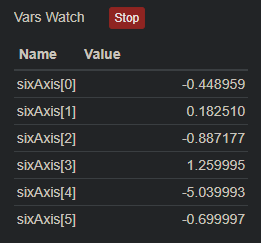
The first 0, 1, 2 values correlate to x, y, z positioning values based on the position of the PixelBlaze.
The next 3, 4, 5 values correlate to x, y ,z movement values based on the angular velocity of the PixelBlaze.
Here is code I used to mess around with the 6-axis sensor and calibrate it for future patterns on my LED hat project
export var sixAxis

// ═══════════════════════════════════════════════════════════════════════════
// GENERIC 3-AXIS CALIBRATION PATTERN
// Use this to find calibration offsets for any sixAxis-based project
//
// HOW TO CALIBRATE:
// Step 1: Uncomment the 3 export lines below smoothing section
// Step 2: Place device in its intended resting orientation, wait 2-3 seconds
// Step 3: Read filteredX, filteredY, filteredZ from the Var Watcher
// Step 4: Copy those values into restingX, restingY, restingZ below
// Step 5: Re-comment the 3 export lines when done
// Step 6: Copy resting values into your actual pattern
// ═══════════════════════════════════════════════════════════════════════════

// ─── RESTING OFFSETS ───────────────────────────────────────────────────────
// Paste Var Watcher values here after reading them with device at rest
var restingX = 0.0  // observed filteredX at rest
var restingY = 0.0  // observed filteredY at rest
var restingZ = 0.0  // observed filteredZ at rest

// ─── SENSITIVITY ───────────────────────────────────────────────────────────
// Sliders appear in Pixelblaze UI, 0-1 slider maps to 0-4x internally
// Start all sliders at 0.25 (= 1x neutral)
// Increase if axis barely reacts, decrease if it instantly pegs to edge
var sensitivityX = 1
var sensitivityY = 1
var sensitivityZ = 1

// ─── SMOOTHING ─────────────────────────────────────────────────────────────
// IIR low-pass filter strength — reduces sensor jitter
// Lower = smoother but slower response
// Recommended range: 0.05 (very smooth) to 0.2 (snappy)
var filterStrength = 0.1

// ─── FILTERED READINGS ─────────────────────────────────────────────────────
// Uncomment these 3 lines during calibration, re-comment when done:
// export var filteredX
// export var filteredY
// export var filteredZ
var filteredX = 0; var filteredY = 0; var filteredZ = 0

export function sliderSensitivityX(v) { sensitivityX = v * 4 }
export function sliderSensitivityY(v) { sensitivityY = v * 4 }
export function sliderSensitivityZ(v) { sensitivityZ = v * 4 }
export function sliderFilterStrength(v) { filterStrength = v * 0.3 }

export function beforeRender(delta) {
  // Negate axes to match your physical orientation
  // If an axis moves opposite to expected, flip its sign here:
  // sixAxis[0] = roll  (left/right)   — negated by default
  // sixAxis[1] = pitch (front/back)   — positive by default
  // sixAxis[2] = vertical             — negated by default
  filteredX = filteredX + filterStrength * (-sixAxis[0] - filteredX)
  filteredY = filteredY + filterStrength * (sixAxis[1]  - filteredY)
  filteredZ = filteredZ + filterStrength * (-sixAxis[2] - filteredZ)
}

export function render2D(index, x, y) {
  var cx = x - 0.5
  var cy = y - 0.5
  var radius = sqrt(cx * cx + cy * cy) * 2

  // Subtract resting offsets, apply sensitivity, clamp to -1..1
  var tiltX = clamp((filteredX - restingX) * sensitivityX, -1, 1)
  var tiltY = clamp((filteredY - restingY) * sensitivityY, -1, 1)
  var tiltZ = clamp((filteredZ - restingZ) * sensitivityZ, -1, 1)

  // ── ZONE DISPLAY ─────────────────────────────────────────────────────────
  // Hat split into 3 zones to visualize all axes simultaneously:
  // Center ring (radius < 0.35) = Z axis — blue  — watch when tilting vertically
  // Left half   (angle < 0.5)  = X axis — red   — watch when rolling left/right
  // Right half  (angle >= 0.5) = Y axis — green  — watch when pitching front/back
  // Brightness = how far that axis is from resting position
  var angle = atan2(cy, cx) / PI2 + 0.5

  var hue, brightness
  if (radius < 0.35) {
    hue = 0.66  // blue = Z axis
    brightness = clamp(abs(tiltZ), 0, 1)
  } else if (angle < 0.5) {
    hue = 0.0   // red = X axis
    brightness = clamp(abs(tiltX), 0, 1)
  } else {
    hue = 0.33  // green = Y axis
    brightness = clamp(abs(tiltY), 0, 1)
  }

  hsv(hue, 1, brightness * brightness)
}
4 Likes
Sebastian,
Thank you for your reply and the included code. Your comments make it hugely readable and understandable even down to when to uncomment or comment things in the calibration process. This looks like a serious leg up in my own process of experimentation. Thanks so much for taking the time to reply!
Daniel
1 Like