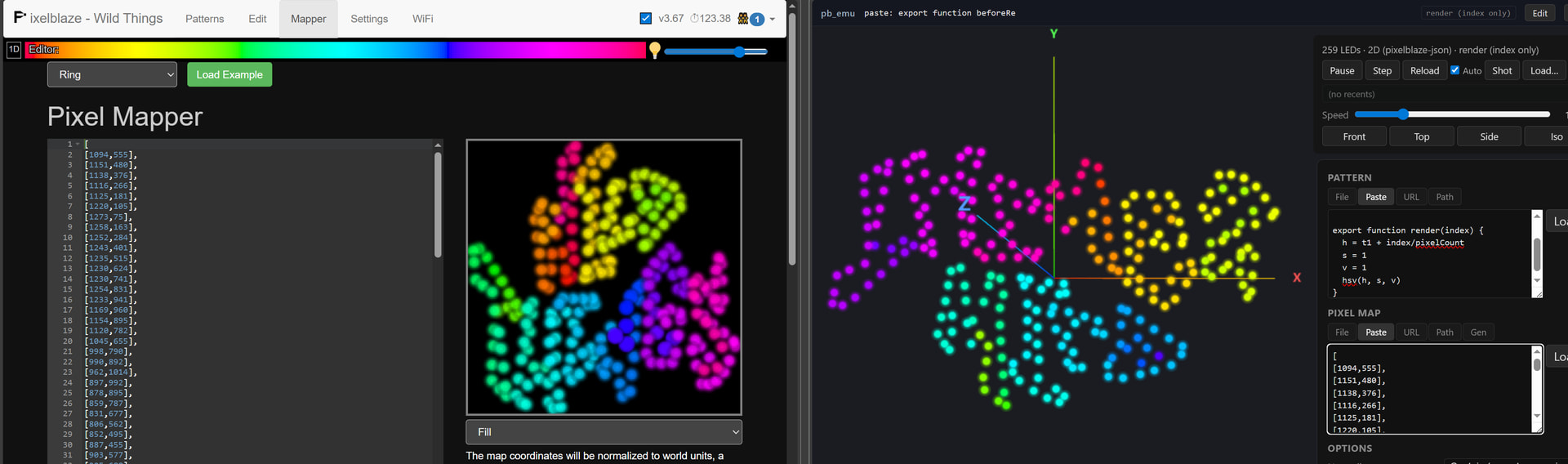
Hi everyone! I’ve been building pb_emu, a browser-based Pixelblaze pattern
emulator. It runs with .js / .epe patterns against pixel maps
and renders the result live with Three.js. No hardware required.
Repo: GitHub - tarballz/pixelblaze-pattern-emulator: A browser-based emulator for Pixelblaze patterns. Runs pattern JS against a user-supplied pixel map (2D or 3D) and renders the result live via Three.js. · GitHub
Some of the features:
- Loads patterns from file, paste, URL, a built-in file browser, or
drag-and-drop.
- Supports 1D, 2D, and 3D maps: Marimapper CSV, Pixelblaze JSON, or a
mapper function. There’s also a Gen tab to spin up an ad-hoc matrix (e.g.
16×16) so you can quickly test a 2D pattern.
- Auto-reload on save: point the
Path tab at a file you’re editing in your
editor and the preview updates within a second of hitting save. You can
mount an external patterns directory via PB_EMU_EXTERNAL_PATTERNS in
.env.local so you don’t have to copy files into the project.
- Exported sliderX/hsvPickerX/rgbPickerX/toggleX/triggerX/inputNumberX
controls render as live widgets; values persist per-pattern in localStorage.
- HUD: LED inspector (click a pixel to see index / raw / normalized coords /
RGB), palette strip when setPalette is active, view presets
(front/top/side/iso), speed slider + single-frame step, screenshot.
- Linter flags hardware-fidelity gotchas at load (e.g. time() in render,
perlin/atan2/sqrt per frame).
Known fidelity gaps
- Math is Float64, not 16.16 fixed-point — patterns that deliberately
overflow at ±32768 or exploit 32-bit bitwise fraction bits will diverge.
Almost every published pattern I’ve tried is unaffected.
- Transform stack (translate/rotate) is tracked but not yet multiplied
through per-pixel coords.
- Sensor-board globals (frequencyData, accelerometer, light) are
zero-filled.
Why
Fast iteration loop when you don’t want to flash a board for every tweak or you’re away from your pb, and a way to preview 3D maps (egg-style scans, Marimapper outputs) before
wiring them to hardware. Happy to hear feature requests, bug reports, or
pattern compatibility issues.
4 Likes
Hi,
This sounds very interesting and potentially very useful, but to me as mostly a hardware guy, I honestly have no clue how to use any of this. (Sorry!) I even built a couple of test fixtures in the past so I can debug patterns sometimes because, for me, that’s the easy approach.
I had a look at the docs, but was really unable to figure out what I would need to be able to start to use this. Is there some kind of minimal step by step guide? Or should I assume that if I don’t understand it to that extent then it’s perhaps not for me anyway? That’s a perfectly reasonable position, by the way - I don’t want to ask for anything that would be burdensome.
Thanks.
Hey there, for the simplest setup, just make sure you have npm installed. Then, you should just be able to run npm install and npm run dev to start the web server. Typically, the server should run at localhost:5173. Then, you would navigate to that link via a web browser. If you want to load your patterns and mapping into a directory so you can browse around them, you could copy .env.example to .env.local and fill in the values for PB_EMU_EXTERNAL_MAPS and PB_EMU_EXTERNAL_PATTERNS.
This is fantastic, I’ve been wanting something like this for ages!
Do you think it is possible to render a 3D view of multiple pixelblazes, each with its own map, running the same .epe -that could simulate the leader/follower functionality? I think your example uses a single map for a single pixelblaze.
Pixelblaze kinda mixes this up (intentionally but with unintended consequences).
For 2D it uses computer graphics convention where y starts at zero on the top and grows down. This is common for 2d.
For 3D it switches to y growing upward which is more common for 3d.
So just adding a 3rd dimension flips the preview.
The emulator is probably treating the y axis the same for 2d and 3d.
there’s a swap-yz option that flips the y and z axes. Would that help flip the map?